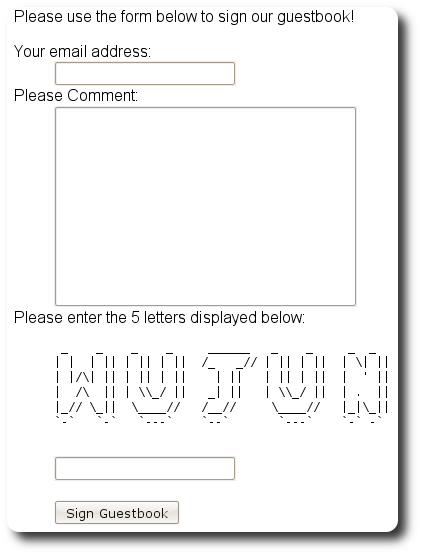
For our guestbook to be useful, we need a form for submitting new entries.
Our first order of business is to create the actual form class. To create the empty form class, execute:
% zf create form Guestbook
Creating a form at application/forms/Guestbook.php
Updating project profile '.zfproject.xml'
This will create the directory application/forms/ with the classfile
Guestbook.php. Open that file and update it so it reads as follows:
// application/forms/Guestbook.php

class Application_Form_Guestbook extends Zend_Form
{
    public function init()
    {
        // Set the method for the display form to POST
        $this->setMethod('post');

        // Add an email element
        $this->addElement('text', 'email', array(
            'label'      => 'Your email address:',
            'required'   => true,
            'filters'    => array('StringTrim'),
            'validators' => array(
                'EmailAddress',
            )
        ));

        // Add the comment element
        $this->addElement('textarea', 'comment', array(
            'label'      => 'Please Comment:',
            'required'   => true,
            'validators' => array(
                array('validator' => 'StringLength', 'options' => array(0, 20))
                )
        ));

        // Add a captcha
        $this->addElement('captcha', 'captcha', array(
            'label'      => 'Please enter the 5 letters displayed below:',
            'required'   => true,
            'captcha'    => array(
                'captcha' => 'Figlet',
                'wordLen' => 5,
                'timeout' => 300
            )
        ));

        // Add the submit button
        $this->addElement('submit', 'submit', array(
            'ignore'   => true,
            'label'    => 'Sign Guestbook',
        ));

        // And finally add some CSRF protection
        $this->addElement('hash', 'csrf', array(
            'ignore' => true,
        ));
    }
}
The above form defines five elements: an email address field, a comment field, a CAPTCHA for preventing spam submissions, a submit button, and a CSRF protection token.
Next, we will add a signAction() to our
GuestbookController which will process the form upon submission. To
create the action and related view script, execute the following:
% zf create action sign Guestbook
Creating an action named sign inside controller
    at application/controllers/GuestbookController.php
Updating project profile '.zfproject.xml'
Creating a view script for the sign action method
    at application/views/scripts/guestbook/sign.phtml
Updating project profile '.zfproject.xml'
As you can see from the output, this will create a signAction()
method in our controller, as well as the appropriate view script.
Let's add some logic into our guestbook controller's sign action. We need to first check if we're getting a POST or a GET request; in the latter case, we'll simply display the form. However, if we get a POST request, we'll want to validate the posted data against our form, and, if valid, create a new entry and save it. The logic might look like this:
// application/controllers/GuestbookController.php

class GuestbookController extends Zend_Controller_Action
{
    // snipping indexAction()...

    public function signAction()
    {
        $request = $this->getRequest();
        $form    = new Application_Form_Guestbook();

        if ($this->getRequest()->isPost()) {
            if ($form->isValid($request->getPost())) {
                $comment = new Application_Model_Guestbook($form->getValues());
                $mapper  = new Application_Model_GuestbookMapper();
                $mapper->save($comment);
                return $this->_helper->redirector('index');
            }
        }

        $this->view->form = $form;
    }
}
Of course, we also need to edit the view script; edit
application/views/scripts/guestbook/sign.phtml to read:
<!-- application/views/scripts/guestbook/sign.phtml -->

Please use the form below to sign our guestbook!

<?php
$this->form->setAction($this->url());
echo $this->form;
![[Note]](images/note.png) |
Better Looking Forms |
|---|---|
|
No one will be waxing poetic about the beauty of this form anytime soon. No matter - form appearance is fully customizable! See the decorators section in the reference guide for details. Additionally, you may be interested in our tutorial on form decorators. |
|
Checkpoint |
|---|---|
|
Now browse to "http://localhost/guestbook/sign". You should see the following in your browser:
|